Guides
What Is Image Inpainting?
Image inpainting is the technique of filling missing or selected regions of a photo so the repair blends with its surroundings. Editors use it to repair damage — scratches, tears, stains — and to remove content they don't want: a stranger in the background, a watermark, a date stamp, an overhead wire.
The name comes from art restoration, where conservators literally fill losses in a painting. In digital photos the idea is the same: the pixels in the hole are gone, and everything around the hole is evidence for what should be there.
How patch-based inpainting works
Classic inpainting algorithms work from the edge of the hole inward, one patch at a time:
- Priority. Each boundary patch gets a score that combines confidence (how much reliable data surrounds it) and a data term (how strongly structures — edges, contours — point into the hole). Filling strong structures first keeps lines connected instead of letting them drift.
- Best match. The algorithm searches the known part of the image for the patch that best matches what is already valid around the hole — usually by comparing pixel differences.
- Copy and repeat. The matched pixels are copied into the hole, confidence is updated, and the process repeats until nothing is missing.
The tool on this site uses feature-priority patch matching, a method published in 2016 (Li, Wang, Liu & Wang, Journal of Computer-Aided Design & Computer Graphics) that adds an image-gradient term to the classic priority so strong structures — fence wires, roof lines, brick courses — get reconstructed first. The implementation runs entirely in your browser. The full story, from the classic 2003 method to this fix, is in our guide to the inpainting algorithm.
Classic inpainting vs AI inpainting
Modern "AI inpainting" usually means generative models: a diffusion model looks at the surroundings and invents plausible new content for the hole — new faces, new textures, whole objects. It is powerful, but it needs GPU servers: your photo is uploaded, generation takes seconds of expensive compute, and the result is a plausible guess rather than your photo's own pixels.
Patch-based inpainting is the opposite trade-off. It only ever borrows real pixels from your image, so it is deterministic, free to run, private, and perfect when the missing area is backed by repetitive texture or simple surfaces. When there is nothing to borrow from — a person against a chaotic crowd — generative models win. Knowing which problem you have is most of the choice. For the full landscape — from 1990s pixel propagation to today's diffusion models — see our complete guide to inpainting techniques.
There is also a middle ground that this site puts in your hands: CNN inpainting models like LaMa learn to reconstruct large, complex holes from millions of photos, yet are small enough to run on a CPU. We offer LaMa inpainting as a browser tool — it needs a one-time model download, then fills holes that patch matching cannot.
What people use it for
- Removing objects — photobombers, trash, cables, logos.
- Removing people from backgrounds — strangers, ex-partners, passers-by.
- Removing watermarks and date stamps from photos you own or have permission to edit.
- Repairing scanned old photos — scratches, dust, folded corners.
- Cleaning up after cropping — filling the gap left when you straighten or reframe a shot.
A related task, outpainting, extends an image beyond its borders instead of filling a hole inside them. It needs to invent new scene content, so it is a generative-model job — this site focuses on inpainting.
See it on a real example
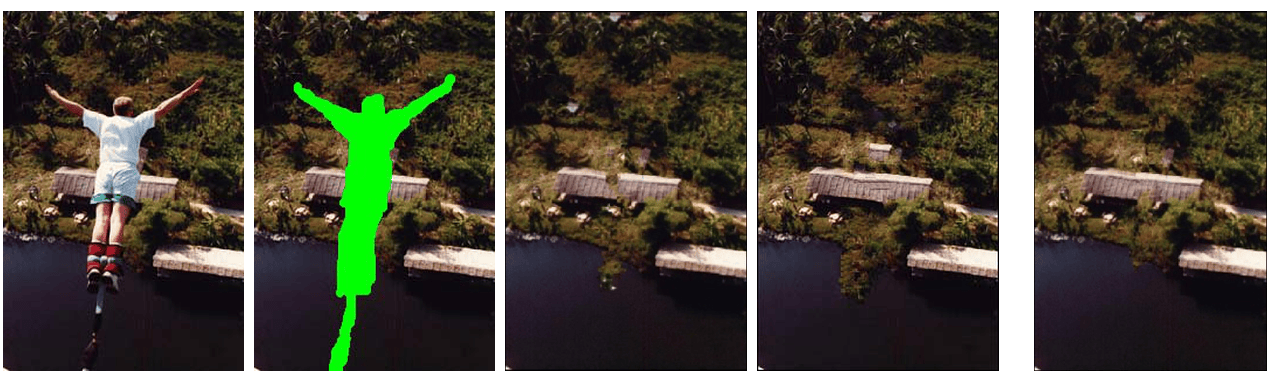
Try inpainting in your browser
The fastest way to understand inpainting is to break a photo and watch it get filled. The tool below takes seconds, needs no account, and never uploads your image.
Common questions
Is inpainting the same as object removal?
Operationally yes — removing an object from a photo is inpainting the hole it leaves behind. “Object removal” (and “magic eraser”) is the consumer name; “inpainting” is the technical one. Same pixels, different vocabulary.
Does inpainting use AI?
Classic patch-based inpainting is algorithmic: geometric priority plus pixel matching. Generative inpainting uses neural networks to synthesize new content. Both are sold as “AI” — check which one a tool actually runs, because it changes privacy, cost and results.
Can it repair a torn or scratched old photo?
Often, yes — scratches and stains over textured or plain areas fill well. Wide losses that cut through faces or intricate detail are the hard case; no inpainting method can recover detail that was never captured.
Why can results look repetitive?
Because the fill is copied from the image itself. Very regular textures (bricks, fabric) fill almost perfectly; when the algorithm must stretch a small amount of source material across a large hole, patterns can visibly repeat.